Chomage: The Playful Display Typeface for Modern Web Design
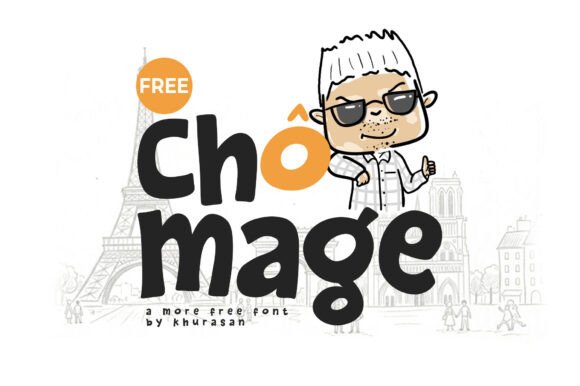
While browsing the latest collection of Freebies, I stumbled upon Chomage, a delightfully thick and playful display font that immediately caught my eye during a late-night redesign session. As a UI designer constantly searching for ways to inject personality into digital products without sacrificing usability, this typeface offered exactly the casual, hand-drawn vibe I needed for a new boutique client project. My goal was to transform a standard corporate landing page into something warm and approachable, and testing Chomage in the hero section felt like finding the missing piece of the puzzle.
How Chomage Transforms Hero Sections with Organic Letterforms
The moment I placed Chomage on the main headline of the landing page, the entire visual hierarchy shifted from sterile to inviting. This freebie is not just another decorative element; it features chunky, organic letterforms with soft, rounded edges that demand attention while remaining incredibly friendly. In web design, the hero section is where you have mere seconds to establish trust and mood, and the unique character of this typeface does the heavy lifting there. Unlike rigid geometric fonts that can feel cold, the hand-drawn quality of Chomage suggests a human touch, which is essential for brands wanting to connect emotionally with their audience.
I tested various weights and sizes, discovering that the font's thickness works beautifully against both solid color backgrounds and high-contrast image overlays. When used as a primary display font for a campaign page or a course sales site, the soft edges prevent the text from feeling aggressive, allowing users to scan the content comfortably. The playful nature of the letters creates an immediate sense of curiosity, encouraging visitors to scroll further down the page rather than bouncing away due to a lack of engagement.
Why Chunky Display Fonts Work Better Than Thin Scripts for Mobile
One of the most critical aspects of modern web design is ensuring readability across all devices, and this is where Chomage truly shines compared to thinner handwritten options. On smaller mobile screens, thin script fonts often lose legibility, forcing users to zoom in, but the substantial weight of Chomage maintains its clarity even at reduced sizes. When I previewed the layout on a smartphone, the soft, rounded edges remained distinct, preventing the letters from bleeding together or becoming pixelated artifacts.
This robustness makes it an excellent choice for call-to-action buttons or short phrases within a responsive navigation bar. While some designers might hesitate to use a display font for functional elements, the balance of style and structure in Chomage allows it to serve dual purposes. It acts as a brand identifier while still functioning as clear communication. For digital product creators building templates or theme assets, knowing that the typography holds up under the scrutiny of fast-loading mobile views is a significant advantage over more delicate alternatives found in typical font collections.
Building Brand Identity with Freebies That Feel Premium
Integrating Chomage into a full brand kit revealed how a single well-chosen font can elevate the perceived value of a website without requiring expensive custom illustrations. By using the organic shapes of the letters, I created a cohesive visual language that extended from the homepage headers to the blog graphics and social media banners. The font's ability to convey a "casual, hand-drawn personality" helps small business owners and creative entrepreneurs differentiate themselves in crowded marketplaces.
In a real-world scenario, imagine a coaching website or a portfolio homepage where the designer wants to appear accessible yet professional. Pairing Chomage with a clean sans-serif font for body copy creates a perfect contrast between the bold, expressive headlines and the readable, neutral text. This combination ensures that the user experience remains smooth and focused, guiding the reader through the content without visual fatigue. The font's unique texture adds depth to flat designs, making static pages feel more dynamic and alive.
Strategic Font Pairing for Editorial and Commercial Projects
Selecting the right companion typeface is crucial when working with a display font like Chomage, as the wrong pairing can create visual chaos. Since Chomage brings such a strong personality with its soft, rounded edges, it pairs exceptionally well with minimalist sans-serif fonts like Inter, Roboto, or Open Sans for long-form content. This strategy keeps the focus on the message while letting the display font handle the emotional tone. For projects requiring a more editorial feel, such as a fashion blog or a lifestyle magazine site, pairing Chomage with a classic serif font can add a layer of sophistication that balances the playfulness of the display type.
When designing for commercial use, such as online shop banners or promotional landing pages, the versatility of these fonts becomes apparent. The included styles allow for creative variations, enabling designers to mix and match different weights to create distinct sections without introducing new typefaces. This consistency is vital for maintaining brand identity across multiple touchpoints. Whether you are creating a digital ad, a newsletter header, or a product packaging mockup, having a reliable set of free resources that look polished saves time and budget.
Maximizing Readability and Engagement in Digital Layouts
Beyond aesthetics, the practical application of Chomage in web projects requires careful consideration of spacing and contrast to ensure optimal readability. Because the letterforms are thick and chunky, adjusting the tracking (letter-spacing) slightly wider than usual can help prevent the text from looking too dense, especially on dark backgrounds. During my testing, I found that increasing the line height for headings containing Chomage improved scanning behavior significantly, allowing users to process the information faster.
For designers working on complex layouts with multiple layers of text, Chomage serves as an effective anchor point. Its distinctive shape breaks up walls of text and draws the eye to key information, such as pricing tiers, feature lists, or testimonials. This visual break is essential for reducing cognitive load and keeping users engaged longer. When used correctly, the font doesn't just decorate the page; it guides the user journey, subtly directing attention to the most important parts of the conversion funnel.
Practical Tips for Using Chomage in Client Projects
Before deploying Chomage in a live environment, it is always wise to check the file formats and licensing terms to ensure they align with your commercial needs. Most high-quality freebies come with specific guidelines regarding webfont usage, so verifying that the package includes the necessary web-ready formats (like WOFF2) is a standard part of the workflow. Additionally, checking for multilingual support can be a game-changer if your client has an international audience, ensuring that the organic letterforms render correctly in different languages.
Ultimately, the decision to use Chomage comes down to the story you want your brand to tell. If your goal is to inject a sense of casual, hand-drawn personality into your work, this typeface offers a delightful solution that balances fun with functionality. By leveraging its chunky, organic letterforms and soft, rounded edges, designers can create digital experiences that feel personal, trustworthy, and memorable. Whether you are refreshing a portfolio, launching a new product, or simply exploring the world of fonts, adding Chomage to your toolkit provides a versatile asset that elevates any project.